Start with the deliverable you need: shortlist HeyGen for avatar-led content, Synthesia for business explainers, and Creatify for product advertising. If you mainly turn recordings into social clips, evaluate a repurposing tool such as Choppity instead. The right Topview AI alternative depends on your workflow, not on who has the longest feature list.
Before switching, identify the friction you want to remove: unpredictable spending, too much editing, an unsuitable video style, or slow approvals. A replacement should address that issue without adding new problems.
Match the alternative to your next deliverable
AI video tools serve different production jobs. Generating a presenter from a script is not the same as editing a product demonstration or extracting highlights from a webinar. Start with the deliverable you produce most often.
| Alternative | Workflow to evaluate | Best fit | Question to ask during a trial |
|---|---|---|---|
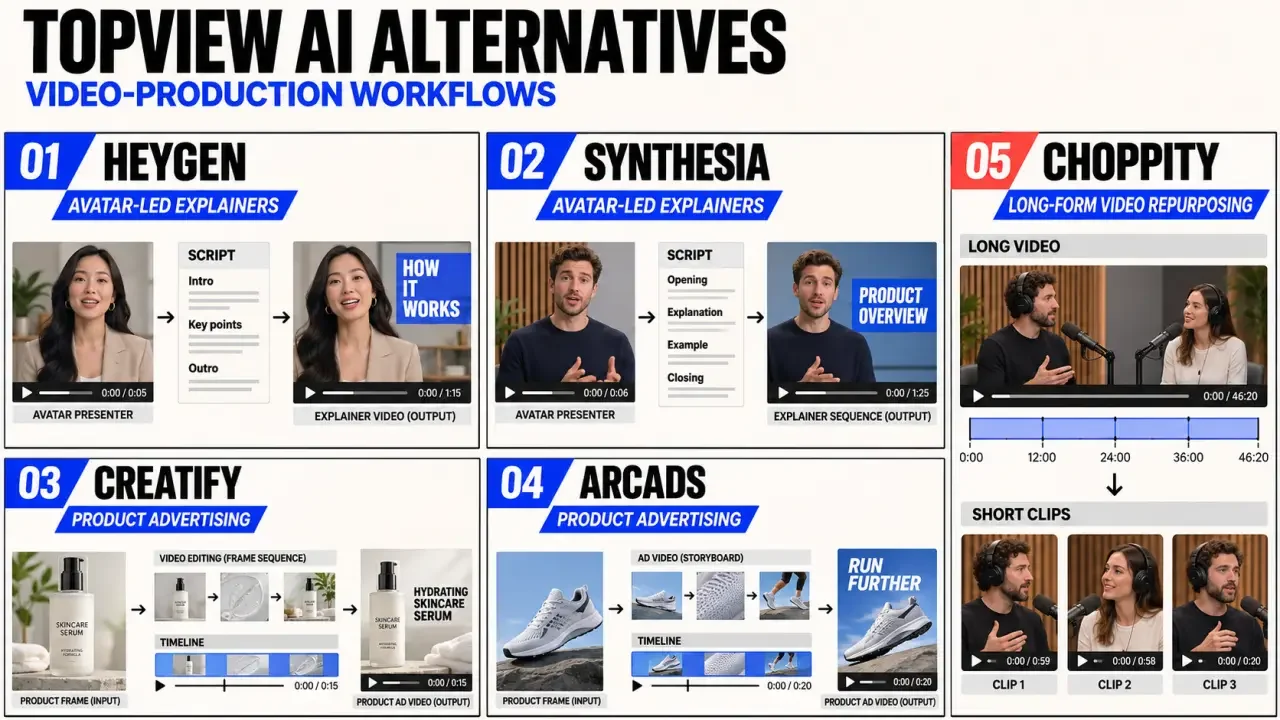
| HeyGen | Avatar-led videos | Creators and marketers using digital presenters | Does the presenter deliver your script naturally? |
| Synthesia | Professional avatar explainers | Training and business communication teams | Can you update and approve content efficiently? |
| Creatify | Product video ads | Ecommerce marketers | How much cleanup does each ad need? |
| Arcads | Actor-style advertising videos | Teams testing presenter-led ad concepts | Does the delivery fit your brand and offer? |
| Choppity | Long-form video repurposing | Podcasters and content teams | Do the selected clips make sense on their own? |
This is a workflow-based shortlist, not a ranking based on hands-on testing. Confirm current features, commercial-use rights, and plan restrictions directly before buying. An avatar platform may not replace a conventional video editor if your workflow depends on detailed timeline control.
Compare output quality where mistakes become expensive
Avatar videos: test your script, not the showcase
For HeyGen and Synthesia, assess pronunciation, pacing, facial movement, and how gestures match the speech. Use your actual product names and specialist terminology. A polished sample does not guarantee that a tool will handle your vocabulary or preferred language well.
If a custom avatar matters, check recording requirements, consent procedures, plan availability, and the process for correcting an unsatisfactory result. For internal training, consistent delivery and easy revisions may matter more than expressive performance.
Product ads and repurposing need different quality checks
With Creatify or Arcads, check whether the video communicates a specific benefit without adding unsupported claims. Pay close attention to the product’s appearance, offer wording, and readable calls to action. For Choppity, see whether automatic selections preserve the speaker’s meaning instead of simply finding energetic moments.
Review each candidate export on the screen where customers will see it. A desktop preview can hide tiny captions, cropped packaging, or interface overlays that cover the offer on a phone. Watch the video muted, then listen without watching. The visual track should communicate the offer, and the audio should remain understandable on its own. These checks can reveal problems a template preview misses.
Compare cost per usable video, not subscription price
No alternative is automatically cheaper. A lower subscription can become expensive when revisions consume credits, export limits interrupt production, or essential controls require an upgrade. Check current pricing and allowances before purchase; static price comparisons can quickly become misleading.
For each shortlisted tool, calculate monthly subscription, usage charges, and editing labor divided by approved videos. Include rejected generations and localization work, not just successful first drafts.
- Generation allowance: Check whether usage is measured in credits, minutes, videos, or another unit.
- Revisions: Find out whether changing a script or regenerating a scene uses more allowance.
- Exports: Confirm watermark removal, resolution, aspect ratios, and commercial-use permissions.
- Team access: Check seat charges, shared assets, approval controls, and workspace limits.
- Commitment: Review cancellation, renewal, unused-credit, and refund terms before choosing annual billing.
For agencies, predictable review cycles can outweigh inexpensive generation. For occasional creators, a modest monthly commitment may be safer than paying for capacity that goes unused.
Run a small replacement test before moving your workflow
Choose two candidates and give both the same script, assets, format, and acceptance criteria. Produce a normal deliverable, not a simplified demo. Track setup time, editing time, regeneration attempts, and any work that still requires another application.
Beginners should judge ease of use across the full process, from brief to export. A friendly opening screen means little if correcting captions or replacing footage is difficult. Teams should test handoffs too: can a colleague find the latest draft, leave useful feedback, and approve the right version?
- Save original footage, scripts, brand assets, and approved exports before changing platforms.
- Check whether editable projects can transfer. Do not assume tools are compatible.
- Rebuild one recurring format and document the steps required to keep it on brand.
- Keep the existing workflow available until the replacement passes a real approval cycle.
The practical choice: start with HeyGen or Synthesia when you need a presenter, Creatify or Arcads when advertising concepts drive the workload, and Choppity when your strongest material already exists in recordings. Switch when a candidate improves your recurring production task at an acceptable total cost.
Questions to ask during a replacement trial
Can you reproduce one real project?
Use a representative script, product asset and brand requirement. A polished demo does not prove that the platform fits your recurring workflow. Compare the time from input to approved export, including corrections.
How predictable is the pricing model?
List the limits that can trigger extra spend: generation credits, render duration, resolution, avatars, seats, storage and commercial usage. Estimate a normal month and a high-volume month before committing.
Does the tool support review and approval?
Teams may need comments, version history, shared brand assets and clear roles. If these are missing, the apparent saving in generation time can be lost in manual review and file transfers.
What quality problems should you inspect?
Look closely at lip sync, hands, product accuracy, text rendering, voice pronunciation, scene continuity and compression. The best alternative is the one whose common errors your team can detect and fix reliably.
How should you migrate?
Keep source media, scripts, brand files and final exports outside the old platform. Run the new tool in parallel for a short period, document the approved workflow and cancel only when the replacement has passed a real delivery test.