Choose WordPress.com if you want hosting and routine technical maintenance handled in one service. Choose self-hosted WordPress, using the software from WordPress.org, if you want more control over your plugins, code, and hosting setup. The right choice depends on the features your site needs, the support you expect, and how much maintenance you’re willing to manage.
The real difference is who runs your website
WordPress is a content management system (CMS) for building blogs, business websites, and online stores. WordPress.org is the official home of the open-source software, not a hosting service. To publish a self-hosted WordPress site, you need hosting from another provider.
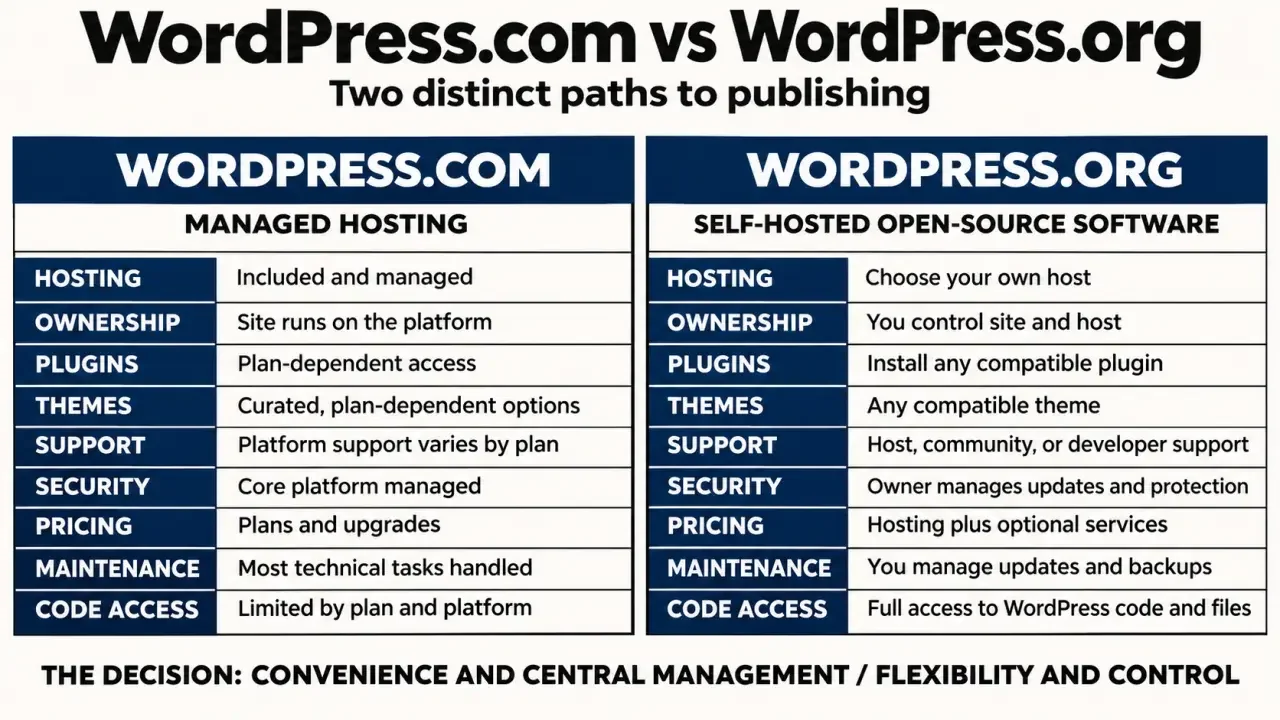
WordPress.com is a managed WordPress host. It combines the software with hosting and manages platform-level security, performance, and updates. The features available to you depend on your plan.
Self-hosted does not mean running a server in your office. Many hosting providers offer WordPress installation and managed services, so you can use the WordPress.org software without handling every server update yourself.
| Criterion | WordPress.com | Self-hosted WordPress |
|---|---|---|
| Hosting | Included | Purchased separately |
| Plugins and themes | Access depends on your plan and platform rules | Broad choice, subject to host compatibility |
| Code and database access | Depends on your plan | Depends on your hosting service |
| Maintenance | Core platform managed for you | Shared between you and your host |
| Support | Dedicated support on paid plans | Host, community, and product vendors |
| Starting cost | Free plan available | Free software; hosting costs extra |
Check your essential features before choosing a plan
The editing experience can look similar on both options, but access to features behind the editor matters. Themes control a site’s appearance; plugins add functions such as booking forms, multilingual content, or ecommerce. The wider WordPress ecosystem offers thousands of themes and plugins, but not every setup supports every product.
On WordPress.com, check the current plan details for plugin installation, theme uploads, and custom code. Higher-level plans may include SFTP, SSH, database management, and staging environments. A feature described in a tutorial as a “WordPress feature” may not be available on every plan.
With self-hosted WordPress, you generally have more freedom to install extensions and modify your site. Hosting restrictions, server resources, and plugin compatibility still apply. More access also creates more opportunities for something to go wrong, so a staging environment is useful for testing changes before they reach your live site.
Before comparing subscriptions, list the tasks your site must perform and rule out setups that cannot support them. A consultant might need appointment scheduling and CRM integration; a publisher might need advertising scripts and editorial permissions. This helps separate essential features from appealing extras, so you don’t choose a plan just because its feature list is longer.
Compare the full bill and the maintenance workload
WordPress.com offers a free plan with a wordpress.com subdomain. It can work for experimenting or running a simple personal project. A custom domain requires a paid plan, so check domain registration, renewal terms, storage, and any feature-related upgrade requirements before committing.
The WordPress.org software is free, but running a live website can still involve several costs. Budget for hosting, domain registration, optional premium extensions, and professional help if needed. Managed hosting can reduce the workload, with some services starting around $25–$35 per month. Use that as a budgeting reference, not a universal minimum or a current quote.
Compare renewal prices, not just introductory offers. Include backups, security tools, staging, and support in your calculations. A low-cost hosting account can become poor value if essential services cost extra or troubleshooting takes up your working hours.
Security is a shared responsibility. WordPress.com manages its underlying platform, while responsibilities on a self-hosted site depend on the host’s services. For either option, use strong authentication and manage user access carefully. Check backup retention, restoration procedures, and whether malware cleanup is included instead of assuming that “managed” covers everything.
Match the support model to your project
WordPress.com can suit beginners who want fewer infrastructure decisions. Paid plans advertise dedicated support with 24/7 availability, but check which channels and services apply to your plan. Having one service provider makes hosting issues easier to direct, although problems with third-party extensions may still need attention from the developer.
With self-hosted WordPress, support comes from different places. Your host handles hosting issues, theme and plugin vendors support their products, and WordPress.org community forums offer guidance. This gives you access to specialized help, but you may need to work out who is responsible for a particular problem.
- Personal blog: WordPress.com is a straightforward starting point if publishing matters more than customization.
- Small business: Compare the specific booking, marketing, and payment integrations you need before choosing either option.
- Developer or agency: Self-hosting often suits projects that need deployment control and flexible environments.
- Online store: Prioritize extension compatibility, recovery procedures, and dependable support over the lowest subscription price.
Keep migration possible without treating it as effortless
You can move from WordPress.com to self-hosted WordPress, but transferring content is not the same as copying a complete, working website. Themes, widgets, integrations, and platform-specific features may need to be rebuilt.
- Choose a destination host and confirm that it supports the plugins you need.
- Export your content and verify that media files transfer correctly.
- Recreate the design and test forms, navigation, and payments.
- Keep the same URL structure where possible, and configure redirects where needed.
- Update your domain settings, then check HTTPS, indexing settings, and backups.
Keep control of your domain account and maintain independent copies of important content. Choose for your next realistic stage of growth, rather than paying for every hypothetical future feature. Before your website becomes business-critical, make sure you understand how you would move it if your needs change.
Common decision questions
Is self-hosted WordPress automatically cheaper?
Not necessarily. The software is open source, but hosting, premium extensions, maintenance and specialist help still have a cost. Compare the complete operating model rather than the entry price alone.
Which option is safer?
Safety depends on how the site is operated. WordPress.com handles much of the platform maintenance. A well-managed WordPress.org site can also be secure, but the owner or host must manage updates, backups, access and incident response.
Can a small business start on WordPress.com?
Yes, when speed and low maintenance matter more than deep customization. Review the plan limits first, especially plugins, themes, ecommerce and integrations, because a later upgrade can change the cost comparison.
What should you document before migrating?
Inventory pages, posts, media, domains, redirects, forms, analytics and email dependencies. Test the new site before changing DNS, preserve important URLs and verify forms and tracking after launch.