Ecommerce content marketing works best when it helps shoppers make a decision, not when it simply fills a publishing calendar. For a small store, start with product questions, buying guides, and post-purchase instructions before investing in a large blog or complex personalization system.
Connect each piece of information to a useful next step: explore a category, compare options, choose a suitable product, or learn how to use a purchase. This makes content part of the shopping experience rather than a separate stream of promotion.
Connect useful content to the shopping experience
Ecommerce content marketing is the creation and distribution of helpful content that attracts, informs, and converts online shoppers. It includes articles, product descriptions, demonstrations, customer stories, social posts, and email, not just promotional campaigns.
Content commerce brings editorial information closer to the act of shopping. A conventional catalog might list hiking boots by product and price. A content-commerce experience can explain how terrain, fit, and waterproofing affect the choice, then help readers explore relevant boots alongside that advice.
The opportunity extends beyond bringing in new visitors. Magnolia cites cart abandonment of 60% to 80% and reports that about one in four online products are returned. These figures are not benchmarks for every store, but they show why purchase confidence matters. Content cannot solve every problem with pricing, delivery, or product quality. It can clarify who a product suits, what it does, and what shoppers should expect, helping prevent avoidable misunderstandings.
Prioritize buyer doubts, then choose the format
Look at support tickets, search queries, customer reviews, and return reasons before deciding what to publish. These sources reveal the questions customers ask in their own words. Group audiences by need rather than building elaborate personas: a first-time buyer may need basic explanations, while a returning customer may want compatibility details or a replenishment reminder.
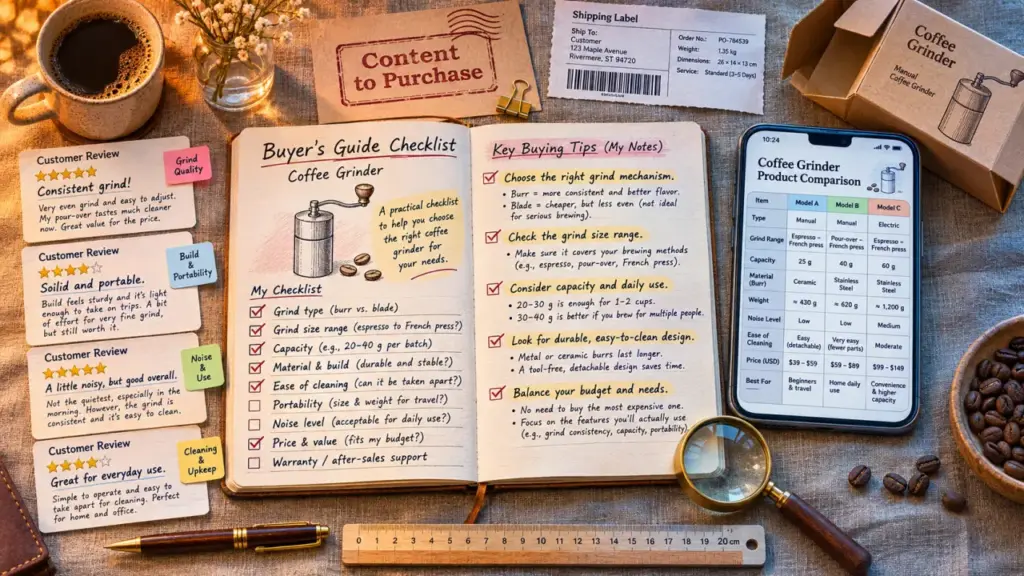
Educational content works like a primer before paint: it prepares readers to understand the information that follows. Before showing a comparison table, explain which specifications matter. Someone choosing a coffee grinder who understands grind consistency can compare product differences instead of relying on price alone. That context makes sales information more useful without adding pressure.
| Buyer need | Useful format | Next step | Relative effort |
|---|---|---|---|
| Understand a problem | Search-focused buying guide | Explore a category | Medium |
| Check product suitability | Detailed product page and comparison | Select a variant | Low to medium |
| See a product in use | Demonstration video or creator content | View the product | Medium to high |
| Use a purchase successfully | Setup email and tutorial | Complete setup | Low to medium |
Start with recurring questions about important products, especially where current information is missing or unclear. Give each content asset a defined audience, one main question, one next action, an owner, and a review date. This keeps production focused and makes it easier to spot outdated guidance.
Create clear answers and distribute them deliberately
Write product pages around suitability, dimensions, materials, compatibility, limitations, and care. Replace vague claims such as “premium performance” with a concrete explanation of what the product does. Where permission allows, include authentic reviews and customer images. Caption demonstrations, and make key details easy to read on mobile.
Keep the brand voice consistent, while adapting the tone to the situation. A playful discovery post can build affinity; a troubleshooting email should be calm and precise. AI tools can help organize content briefs or identify unanswered questions, but a knowledgeable reviewer should verify specifications and claims before publication.
- Organic search: Match each page to a distinct search intent. Write descriptive titles and metadata, and connect guides to relevant category and product pages with internal links.
- Social and creators: Adapt demonstrations for YouTube, Pinterest, or other channels customers use. Choose influencers based on audience relevance, not follower count alone.
- Email: Use welcome, abandoned-cart, and post-purchase sequences to address genuine questions or objections. Repeated discounts are not a substitute for useful information.
- Paid distribution: Promote useful content to a defined audience, with a budget limit and a clear destination, such as a guide or product page.
Organic distribution still takes ongoing work: content needs production, updates, and maintenance, even without media spend. Paid distribution can accelerate reach, but that reach stops when spending stops. Test a focused mix of channels before expanding, and use each channel for a clear purpose.
Use the simplest technology that keeps information accurate
For many smaller stores, the ecommerce platform’s built-in CMS, email automation, and analytics are a sensible place to begin. Before buying more software, check whether the existing tools support flexible editing, mobile presentation, product links, and event tracking. Compare the total cost, including implementation, integrations, training, and maintenance, rather than looking only at subscription fees.
A headless CMS separates content management from how content appears to customers. It can distribute reusable content across storefronts and apps through APIs. That flexibility also brings development work, preview requirements, and integration maintenance. A store with one website may not need that added complexity.
As the system grows, connect the CMS, product catalog, digital asset management, and analytics with consistent product identifiers. Assign clear ownership for updates. Otherwise, an old guide may contradict current product specifications or show content that no longer matches the catalog.
Keep personalization simple at first. Recent buyers can receive setup advice, while newcomers see introductory guidance. Use data customers have consented to share, provide sensible defaults, and avoid collecting information without a defined purpose. Personalization should make a decision easier, not create more messages to manage.
Measure shopping progress, then improve the bottleneck
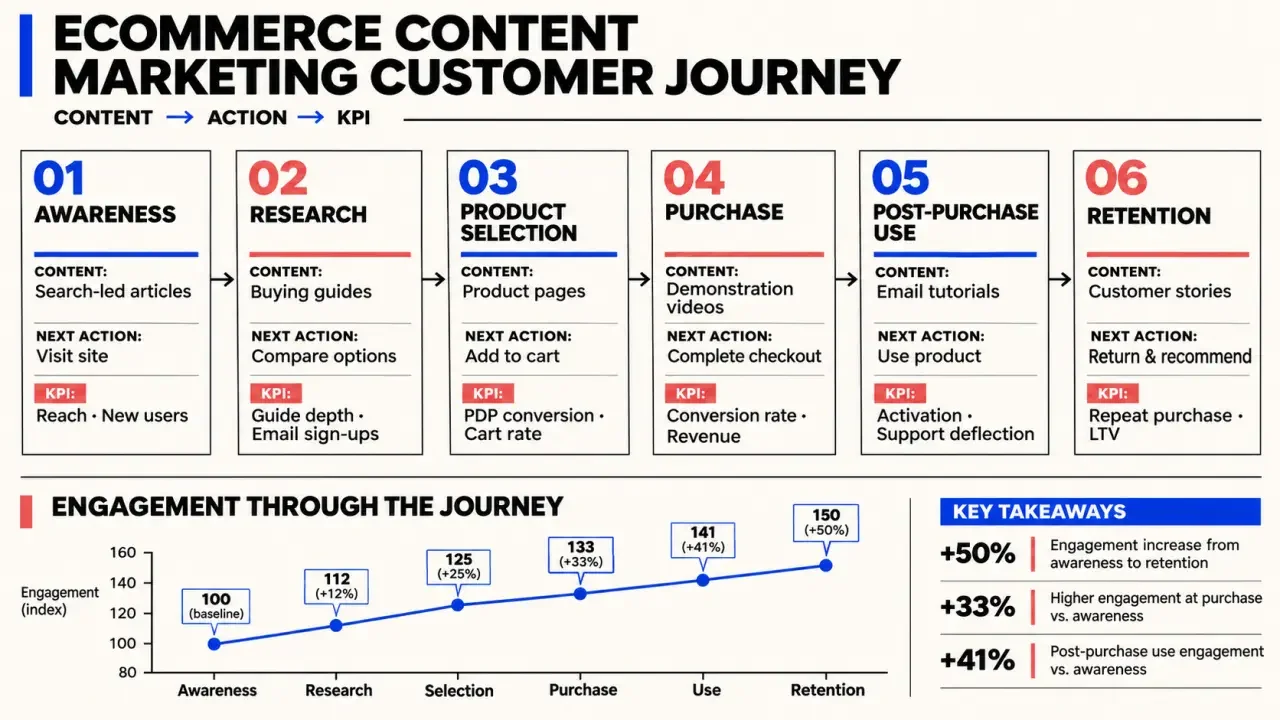
Use Google Analytics and store reporting to connect content exposure with product views, add-to-cart events, purchases, and revenue. Consistent campaign tags help keep traffic sources interpretable. Where possible, compare the role of content across the customer journey rather than judging every article only by immediate purchases.
- Discovery: Track qualified traffic, search visibility, and traffic sources.
- Consideration: Track product-link click-through rate, video engagement, and add-to-cart behavior.
- Purchase: Track conversion rate and revenue, distinguishing direct purchases from content-assisted journeys where reporting allows.
- Retention: Track repeat purchases, return reasons, and support requests related to product use.
Page views and bounce rate need context. A reader may find a complete answer without visiting another page, so a short session does not always mean the content failed. Attribution is also imperfect across devices and channels. Compare similar audiences and periods, test meaningful changes, and refresh inaccurate information first. Start with one high-value buying question, improve its path to purchase, and expand when results justify the effort.