
Choose SEO ranking reporting software around the decisions you need to make: which pages need attention, whether visibility is improving, and whether organic search brings useful traffic. A small business may need Google Search Console and a focused rank tracker. An agency may also need automated, branded client reports. An audit tool alone does not cover either workflow.
Separate ranking measurement from website diagnosis
SEO ranking reporting turns search-position data into a record of progress and next steps. Software tracks selected keywords, compares results over time, and groups changes by page, topic, location, or device. A useful report connects ranking movements with clicks and business outcomes instead of treating every higher position as a win.
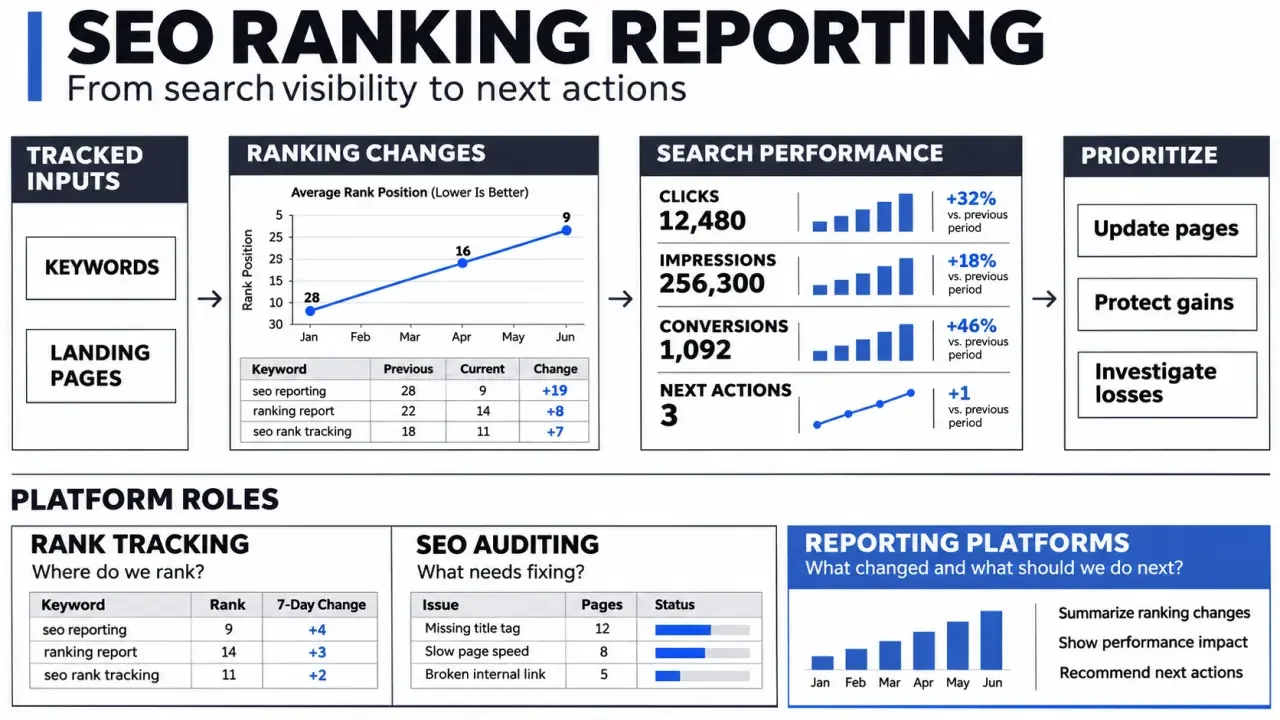
Tracking, auditing, and reporting can overlap in one platform, but each answers a different question. Knowing which function you need makes it easier to compare tools and avoid paying for features that do not support your workflow.
| Tool category | Primary question | Main limitation |
|---|---|---|
| Rank tracker | Where do selected keywords rank over time? | Measures only the queries and settings you track. |
| SEO analyzer or audit tool | What website issues need investigation? | An audit score does not demonstrate ranking growth. |
| Reporting platform | How can performance data be combined and explained? | Its usefulness depends on connected data and interpretation. |
Reports can help identify declining pages, emerging opportunities, and gaps between visibility and traffic. They do not improve rankings by themselves. Someone still needs to investigate the findings, decide what matters, and implement changes.
Build reports around a small set of meaningful metrics
A keyword-position chart is a starting point, not a complete performance assessment. Keep the tracking scope consistent, and include enough context to distinguish genuine progress from a change in measurement. A report should make clear what was tracked and what the numbers can, and cannot, tell you.
- Keyword and landing page: show the query, intended URL, and actual ranking URL to reveal page mismatches.
- Current and previous position: include comparison dates, search engine, location, and device.
- Search visibility: summarize tracked keyword performance and explain how the software calculates the metric.
- Clicks, impressions, and click-through rate: use Search Console to understand actual Google Search exposure and visits.
- Organic conversions: include relevant analytics outcomes, such as inquiries or purchases, when conversion tracking is configured.
- Actions and ownership: state what should happen next and who is responsible.
Keep branded and non-branded queries separate. More searches for your company name can make the overall picture look stronger while performance remains weak for the services or products you want new customers to find.
Treat the report as a decision aid, not a trophy cabinet. Define in advance what deserves investigation. For example, a commercially important page losing visibility across several relevant queries while its clicks also fall is a stronger signal than one isolated position change. The first pattern may point to a problem worth examining; the second may be a temporary fluctuation. This gives stakeholders a shared basis for deciding what to do instead of another dashboard to monitor.
Compare software by the job you need done
Start with the missing capability, not the longest feature list. Google Search Console is a useful baseline for understanding your own site’s Google Search performance. Its average position reflects recorded impressions, so it is not the same as a rank tracker checking a fixed query under specified conditions. The two data sources can support different questions in a report.
If you need repeatable keyword monitoring by market or device, evaluate a dedicated rank tracker. If you need technical or on-page recommendations, consider an audit tool. Rank Math’s SEO Analyzer is an example of the analyzer category, while SEOptimer emphasizes website audits and branded reporting.
SEOptimer advertises PDF audit generation in 20 seconds. Treat that as a report-generation claim, not evidence that a full SEO investigation or improvement happens in that time. Check whether the report covers the issues relevant to your website and presents recommendations clearly.
- Small businesses: prioritize straightforward setup, relevant keyword coverage, and readable exports.
- In-house teams: look for page and topic segmentation, historical comparisons, and analytics integration.
- Agencies: verify multiple-client management, scheduled delivery, white-label customization, and access controls.
Compare total cost against the same workload. Check keyword allowances, how locations and devices are counted, refresh frequency, retained history, client seats, and reporting add-ons. Verify current plan details directly rather than assuming every feature is included in every subscription.
Test the workflow before committing to a subscription
Setup effort depends on defining what you want to measure as well as connecting accounts. Start with a manageable group of commercially relevant queries and landing pages. Larger suites can also take time to learn, particularly when you need to understand filters, visibility calculations, and report templates.
- Set the scope: choose the target search engine, market, language, and device.
- Create a baseline: record starting positions and note major website changes.
- Connect supporting data: bring in search traffic and conversions where integrations allow.
- Review a sample report: check whether a non-specialist can understand the results and proposed action.
- Test delivery: confirm exports, scheduling, branding, and client permissions before purchase.
Daily tracking may suit close monitoring, while a weekly review and monthly stakeholder summary are practical starting points. Avoid reacting to every fluctuation. Rankings vary with location, device, timing, and the composition of search results, so a single change does not necessarily show a lasting trend.
End each report with a short decision summary: what changed, what might explain it, what remains uncertain, and what happens next. Choose the tool that makes this workflow reliable with the least manual cleanup, not the one that produces the most pages.
Reporting questions teams often overlook
How often should a ranking report run?
The useful frequency depends on decision speed. Weekly tracking can help active campaigns, while a monthly executive view is often enough for trend interpretation. Daily movement should not be mistaken for a strategic change without supporting evidence.
Should every tracked keyword appear in the client report?
No. Separate operational tracking from stakeholder reporting. Show the keyword groups, landing pages and visibility measures that explain business progress, then keep the full keyword inventory available as supporting detail.
How do you avoid misleading comparisons?
Keep location, device, search engine and measurement method consistent. Annotate migrations, major content releases and algorithm events. A clean baseline makes changes easier to explain.
What makes a report actionable?
Each important observation should lead to a decision, owner or next check. A dashboard full of positions is descriptive; a useful report connects movement to pages, technical issues, content opportunities and expected business impact.