
Start with pages that should attract customers but cannot be discovered, crawled, or indexed. Fix those blockers before polishing performance scores. This technical SEO audit checklist follows that order, with checks for a single URL or an entire site.
A technical audit identifies obstacles, not guaranteed ranking gains. Its practical outcome is a verified repair queue with affected URLs, evidence, priorities, owners, and clear retests.
1. Set the scope and collect evidence
For a single-URL audit, inspect the page, its incoming internal links, rendered content, HTTP response, and indexing signals. For a site-wide audit, crawl the domain and group findings by template, such as product pages, categories, and articles. A template-level fix can resolve the same issue across many URLs.
- Google Search Console: Review Page indexing, Sitemaps, and URL Inspection. Compare reported exclusions with the pages you want indexed.
- Screaming Frog or Sitebulb: Collect status codes, directives, canonicals, internal links, and metadata. JavaScript rendering needs extra configuration and resources.
- PageSpeed Insights: Assess representative mobile pages, not just the homepage.
- Server logs: Check crawler requests when a large site has unexplained discovery or refresh problems.
Mark each check as pass, fail, or N/A. Keep “not tested” separate: missing evidence is not a pass. Search Console and PageSpeed Insights are free starting points. Crawler licensing and limits vary, so check current terms before choosing a paid workflow.
2. Trace the route from crawling to indexing
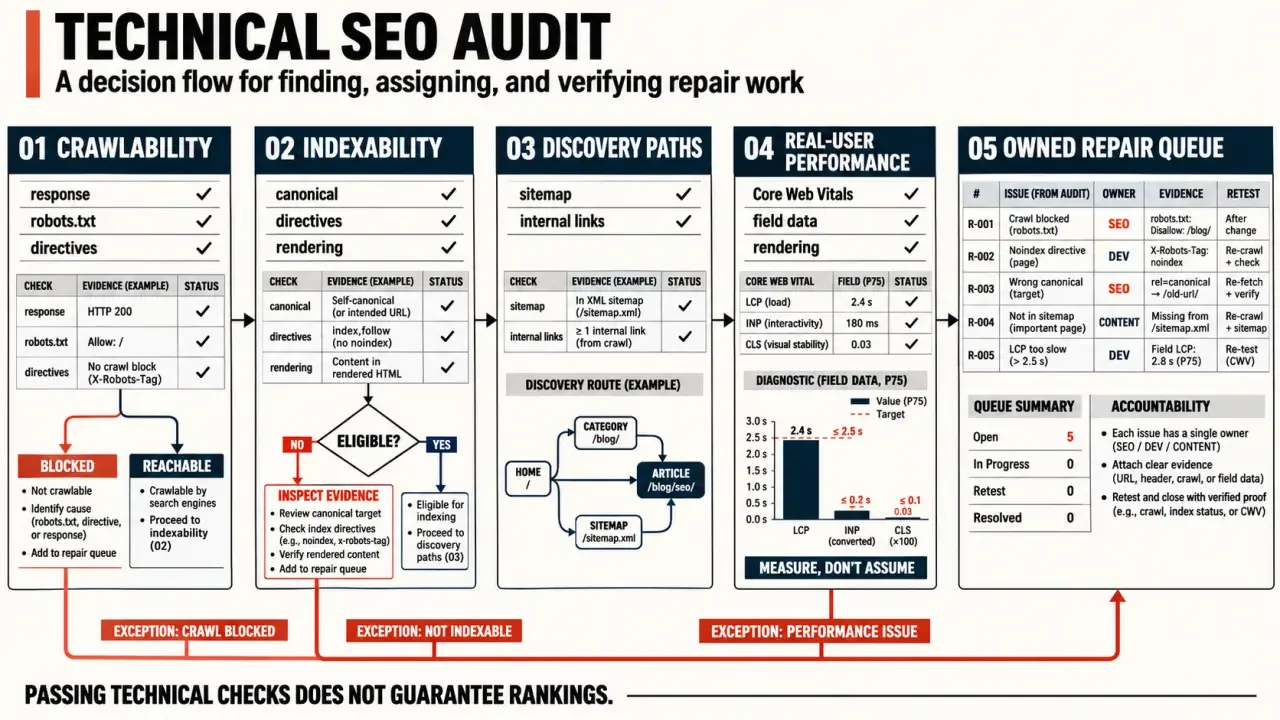
Crawlability means a search engine can fetch a URL; indexability means the page is eligible for inclusion. Neither guarantees that a page will be indexed. For an important page missing from search, check the following in order.
- Response: Confirm that the intended page returns a 200 status code. Investigate 5xx errors and soft 404s, where an empty or error-like page returns 200.
- Access: Inspect robots.txt rules. A blocked URL can still appear in search, and blocking a page prevents search engines from seeing its page-level noindex directive.
- Directives: Check the robots meta tag and X-Robots-Tag header for unintended noindex instructions.
- Canonical signals: Verify that the canonical points to the intended, indexable URL. Align internal links and XML sitemap entries with that preference.
- Rendering: Use URL Inspection to check whether essential text and links appear in the rendered output, especially on JavaScript-heavy sites.
- Sitemaps: Include preferred, indexable URLs, not redirects, errors, or deliberately excluded pages.
For ecommerce sites, check filters and sorting parameters that create excessive URL combinations. Use crawl data and server logs to see whether they consume meaningful crawler activity before treating crawl budget as the main issue.
3. Repair discovery paths and URL handling
Compare your crawl with sitemap, analytics, and CMS URL exports to find potential orphan pages. A crawler that follows internal links cannot reliably find pages with no incoming links. Check whether important destinations are reachable through navigation, contextual links, and breadcrumbs.
A sitemap lists URLs, but it does not replace a working path through the site. Trace a route from a category page to a product. Each link should be crawlable, descriptive, and direct. This can reveal products or other pages that exist in your site data but are hard for visitors and search engines to find.
- Replace broken internal links and links that pass through unnecessary redirects.
- Review excessive click depth, but do not treat three clicks as a universal ranking rule.
- Make sure pagination exposes crawlable links. Do not rely only on load-more interactions.
- Verify valid HTTPS certificates, consistent preferred hosts, HTTP-to-HTTPS redirects, and the absence of mixed content.
- Test migration redirect maps. Use permanent redirects for permanent moves, avoid chains and loops, and return genuine 404 responses for missing pages without suitable replacements.
4. Test template quality and real-user performance
Check mobile layouts for readable content, usable navigation, and intrusive elements. For Core Web Vitals, the good thresholds are LCP at or below 2.5 seconds, INP at or below 200 milliseconds, and CLS at or below 0.1, measured at the 75th percentile of visits. Field data reflects real users. Lab diagnostics help investigate causes, but their results may differ.
- Slow loading: Inspect the largest content element, oversized images, server response, caching headers, CDN behavior, and render-blocking CSS or JavaScript.
- Slow interactions: Investigate expensive scripts and main-thread work. Smaller images alone may not resolve INP problems.
- Layout shifts: Reserve space for images, embeds, and banners.
- Page signals: Review descriptive titles, useful meta descriptions, a logical heading hierarchy, and structured data that matches visible content.
- International pages: Validate hreflang language and region codes, reciprocal references, and consistency with canonical choices.
Fix defects shared across templates before addressing isolated cosmetic warnings. Duplicate descriptions deserve review, but they are not equivalent to a noindex directive that excludes an entire product category.
5. Turn findings into an owned repair queue
Copy this structure into a spreadsheet, then add affected URLs, evidence, status, owner, and retest date. Prioritize issues by business importance, scope, and confidence in the diagnosis, not simply by the number of crawler warnings.
| Finding | Priority | Evidence | Likely owner |
|---|---|---|---|
| Unintended noindex on sales pages | Critical | Directive and URL Inspection | Developer or CMS administrator |
| Broken category navigation | High | Crawl and browsing path | Developer |
| Poor template-level performance | By scope and impact | Field data and diagnostics | Frontend team |
| Duplicate page titles | Usually lower | Crawl export | SEO or content team |
Give each ticket a specific acceptance test. After deployment, recrawl the affected URLs, verify the rendered output, and monitor Search Console. A repair is complete when the intended behavior has been confirmed, not just when the ticket changes status.
Questions that improve the audit handoff
Who owns each fix?
Assign findings to the team able to change them: developers for rendering and status-code defects, editors for content signals, and infrastructure owners for server or caching issues. An unowned recommendation is unlikely to ship.
How should issues be prioritised?
Start with blockers that affect important pages at scale. Indexation, canonical and server failures usually outrank cosmetic warnings. Record impact, confidence, effort and affected templates so the team can choose a rational sequence.
When should the site be crawled again?
Re-crawl after the deployed fix is publicly available and caches have cleared. Validate a small sample manually as well, because a clean crawler report does not always prove the intended page is rendered correctly.
What evidence belongs in the final report?
Include the failing URL, observed signal, expected state, recommended owner and verification method. Screenshots or response excerpts can help, but keep the report focused on reproducible evidence rather than a large export of low-priority warnings.